
XingfuMama offers a Photo Challenge for September: “The challenge is simple: take one photo and get creative with it by processing it three different ways.”
I am using Lunapic.com. This is one of my favorite photo editing sites. When you want to save your photo after tweaking/filtering in LunaPic, go to file, click and a save box will drop down. Choose the format you want to save your photo in. The photograph is automatically saved in your download file. The file ending up in the download file tripped me up for awhile, but I finally figured it all out. It is so much fun to tweak your photos in LunaPic. You can also add text. You can save file, then you can go on tweaking without uploading the original again if that is how you are inclined to work. Have fun. Thanks to XingfuMama for the challenge.
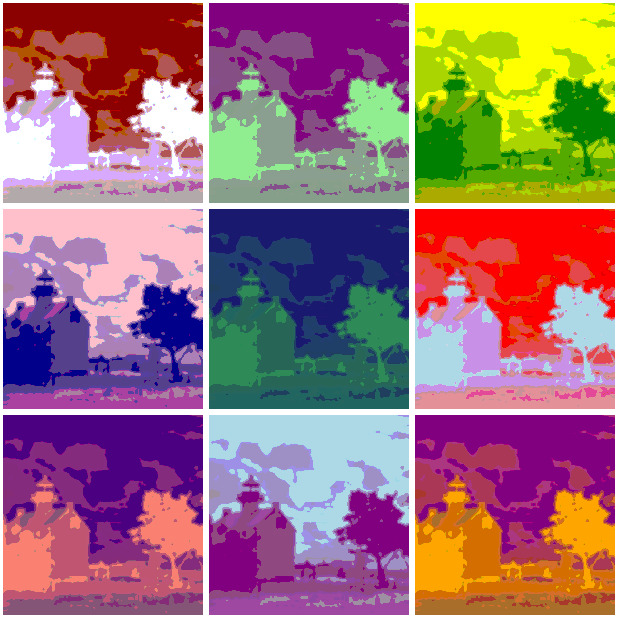
The first filter I used was the ‘Homer’ Art Filter – One of the Famous Artists Filters.

The second filter I used was in the filter column and was called Thermal Iridescence. It is rather bright, but I love the way the filter accentuates the negative space in the photo, especially in the foliage of the tree. This is a good filter to use to help compose a painting or other artwork using the lighthouse photo as a reference.

The third filter is the Warhol Effect. I think all three tweaks of the photograph turned out well. Give Lunapic a try when you have some time to play around with photo editing.
The beautiful skies depicted in these photographs are part of Skywatch.


Cool takes. The photo really worked well with all of your techniques. I particularly like how the “Homer” one seems to make the picture look 3D.
LikeLiked by 1 person
I really like like the ‘Homer’ filter too. I am going to use it again on a few photos that I think will be good choices with it. Thanks so much for the challenge opportunity and the comment.
LikeLike
The Homer effect photo is extra lovely! I am hoping to try out Lunapic as well. Thanks for the tip
LikeLiked by 1 person
I think you will have a lot of fun with it. So many things to play around with and tweak.
LikeLiked by 1 person
😁
LikeLike
Pingback: One-to-Three Photo Processing Challenge-October 2023 | XingfuMama